
Thursday, March 11, 2010


SVG - quo vadis
Just AMAZING !!!
WARNING: use the right browser for each sample
http://svg-wow.org/audio/animated-lyrics.svg
http://svg-wow.org/photoAlbum/album.svg
http://svg-wow.org/audio/
http://svg-wow.org/photoAlbum/
Tuesday, March 9, 2010
PosterGenius keygen or cracked
Welcome guest,
you are probably here because your are googling for a free (and/or cracked) version of PosterGenius.
Instead of using a cracked unstable and unsupported copy of this software i have a challenge for you.
As a member of PosterGenius dev team i will provide 3 PosterGenius personal licenses to 3 guys who will have the best argument.
Just answer to this simple question:

The best answers will win a free official license of PosterGenius.
you are probably here because your are googling for a free (and/or cracked) version of PosterGenius.
Instead of using a cracked unstable and unsupported copy of this software i have a challenge for you.
As a member of PosterGenius dev team i will provide 3 PosterGenius personal licenses to 3 guys who will have the best argument.
Just answer to this simple question:
"Why do you need/want a free license of PosterGenius?"

The best answers will win a free official license of PosterGenius.
Monday, March 8, 2010
Nebula Gallery widget in production
Nebula gallery widget usage in a commercial quality application:


Application: PosterGenius (http://www.postergenius.com)
Sunday, March 7, 2010
Install PosterGenius on Linux with no tears
A simple step-by-step guide to install PosterGenius on Linux (Ubuntu)
First of all you have to download our .deb package. The package for the moment is available for internal purposes only. But if anyone out there wants to try our early release of PosterGenius for Linux please let me know.
PosterGenius for linux will be available for free. Stay tuned, we will make it available to the public very soon.
Download
Download .deb package and save it in your hard drive.
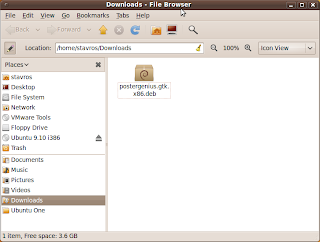 Launch gdebi installer
I suggest the more user-friendly gtk version. Start a ternimal and type
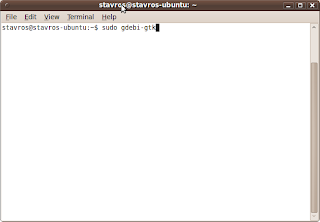 The package installer will follow:
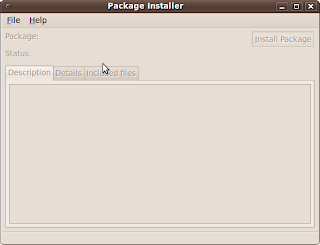
Point to .deb package
Use installer's File menu and point to .deb package of PosterGenius
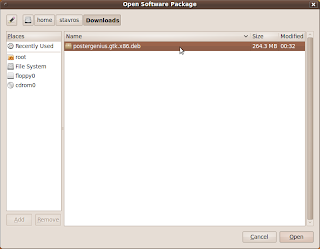 Select PosterGenius .deb package and click "Open"
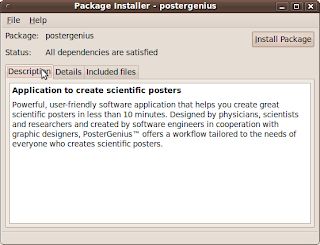 Click "Install Package"
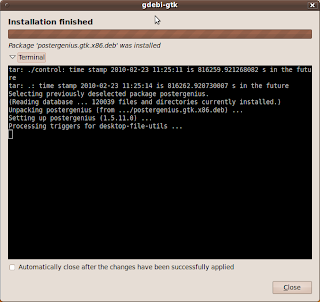 Click "Close"
Launch PosterGenius
PosterGenius entry is available at "Applications > Graphics > Postergenius".
PosterGenius Screenshots
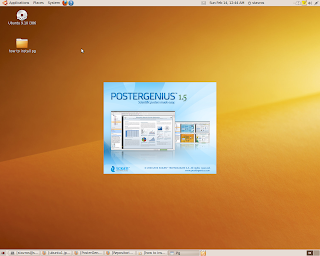
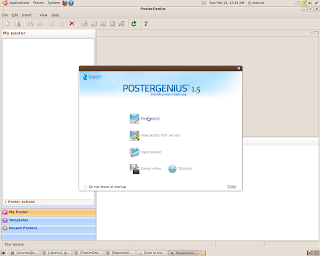
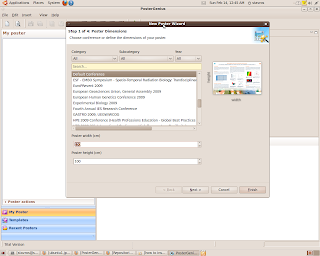
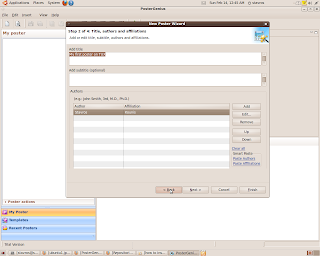
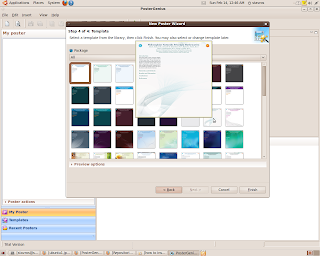
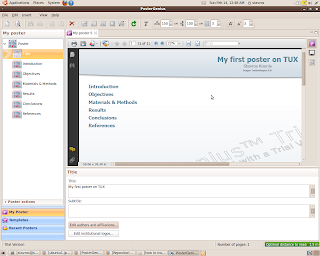
This blog-post as poster
Download this article as poster or/and pdf print friendly format. Both was created with PosterGenius for Linux
Install PosterGenius on Linux with no tears - Poster (pdf)
Install PosterGenius on Linux with no tears - print friendly (pdf)
First of all you have to download our .deb package. The package for the moment is available for internal purposes only. But if anyone out there wants to try our early release of PosterGenius for Linux please let me know.
PosterGenius for linux will be available for free. Stay tuned, we will make it available to the public very soon.
Download
Download .deb package and save it in your hard drive.
 Launch gdebi installer
I suggest the more user-friendly gtk version. Start a ternimal and type
sudo gdebi-gtk
 The package installer will follow:

Point to .deb package
Use installer's File menu and point to .deb package of PosterGenius
 Select PosterGenius .deb package and click "Open"
 Click "Install Package"
 Click "Close"
Launch PosterGenius
PosterGenius entry is available at "Applications > Graphics > Postergenius".
PosterGenius Screenshots


This blog-post as poster
Download this article as poster or/and pdf print friendly format. Both was created with PosterGenius for Linux
Install PosterGenius on Linux with no tears - Poster (pdf)
Install PosterGenius on Linux with no tears - print friendly (pdf)
Saturday, March 6, 2010
PosterGenius, finalist for the eclipse community awards 2010
PosterGenius has been selected as one of the three finalists for the Best RCP Application for the 2010 Eclipse Community Awards.
Regardless of whether we will win the contest or not we already feel winners. It's a great recognition for 3 years of really hard work for one of the best team i have work with ever.
Please let me introduce this team:
- Pavlos Moustakidis
The man with the vision to simplify poster creation process - Stavros Kounis
This is me. - Sakis Kotisis
A kick ass java programmer that join us just after the first prototype of PosterGenius. Maybe the most talented programmer i have ever meet. - Georgos Tsopouridis
A non-programmer that can build eclipse rcps and plugins better and faster than everyone else. Is the never-tired part of our team. - Stefanos Manolakis
Our rookie that easily adapt it's skills from one technology to another. Is the man that do all the dirty jobs and clean up everything.
And last but not least:
- Evangelos Karageorgos
Our designer, marketing leader, QA leader and typography guru. We hate him. Is our nightmare. He believes that anything designed in Photoshop can be implemented in GUI.
Finally i want to give some credits to:
- Eclipse Platform
It was our choice from the beginning. Thanks to this great technology we have reach our goals. Is the platform we can rely on. - Eclipse Community
Several issues in the platform have been resolved upon our requests (in bugzilla). - Nebula Team
Nebula Gallery is heavily used in our product.
Friday, March 5, 2010
Event log stopped working - Error 1747
After a restart it was unable for my lap to establish wireless or wired networks connections.
Googling around the only solution looks to be O/S re-installation ! :-(
Thanks to Al Oliveira's post the solution was very simple:
Now everything works like a harm and i have not lost a whole day.
Googling around the only solution looks to be O/S re-installation ! :-(
Thanks to Al Oliveira's post the solution was very simple:
c:>netsh winsock reset
Now everything works like a harm and i have not lost a whole day.
Subscribe to:
Posts (Atom)